Grid and snap
The Grid display and Snap grid help you draw quickly and accurately
Grid display
A grid is a series of even lines or points that serve as a visual representation of distances.
The grid is not part of the drawing and is therefore not printed.
How to show or hide the grid:
- Click Grid on the status bar.
or
- Press the function key F7.
Snap grid
The snap creates a set of evenly spaced invisible magnetic points that the crosshairs are forced onto as you draw. You can only catch these points with the mouse.
How to turn the snap grid on or off:
- Click Snap on the status bar.
or
- Press the function key F9.
How to change the grid display and snap grid settings:
- Click the icon Format > Draftsettings
 on the Ribbon.
or
- Enter DSETTINGS in the command window.
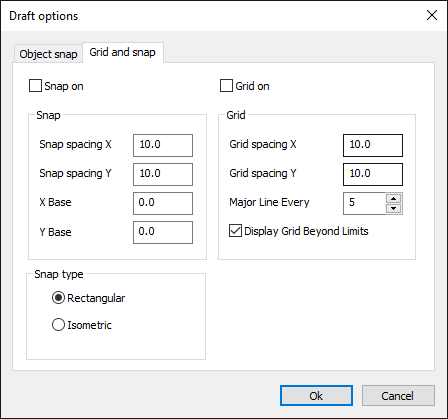
- In the dialog box, click the Grid and Snap tab.
- Change the settings in the Grid area for Distance X and Y.
- Change the settings in the Snap area for Distance X and Y.
- Exit the dialog with OK.