Point styles
The PType command allows you to specify how points are represented in your drawing.
This is how you open the Point Style Dialog:
- Click on Format > Point style
 on the Ribbon.
or
- Enter PTYPE in the command window.
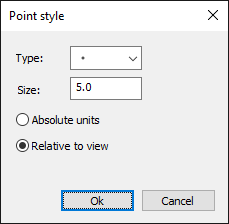
How to change the point style :
- Click on Format > Point style on the Ribbon.
or
- Enter PTYPE in the command window.
- Select a display type from the type list.
- Enter a value for the point size.
- Select a size reference option
Absolute units: The point size is specified in drawing units.
Relative to display: The point size is specified relative to the size of the graphics area. - Click the OK button.