Unit system
With the Units command you define the following settings:
- Format for linear and angular units
- Precision for linear and angular units
- Reference unit for inserting blocks into the current drawing
This is how you define the system of units for the current drawing:
- Click on Format > Unit system
 on the Ribbon.
or
- Enter UNITS in the command window.
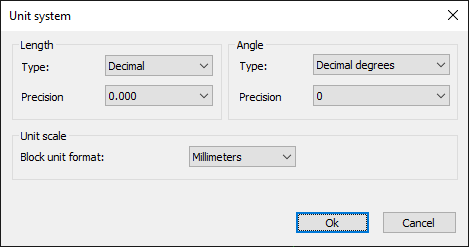
- In the Lengths area, select a type for linear units.
- In the Lengths area, select an accuracy for linear units.
- In the Angle area, select a type for angle units.
- In the Angle area, select a precision for angle units.
- Choose a reference unit for inserting blocks.