Dimension styles
When you add a new dimension, this dimension is assigned the active dimension style.
With the DimStyle command you can define new dimension styles and activate, change or delete existing dimension styles.
Manage dimension styles
This is how you open the dimension style dialog:
- Click on Format > Dimension style
 on the Ribbon.
or
- Enter DIMSTYLE in the command window.
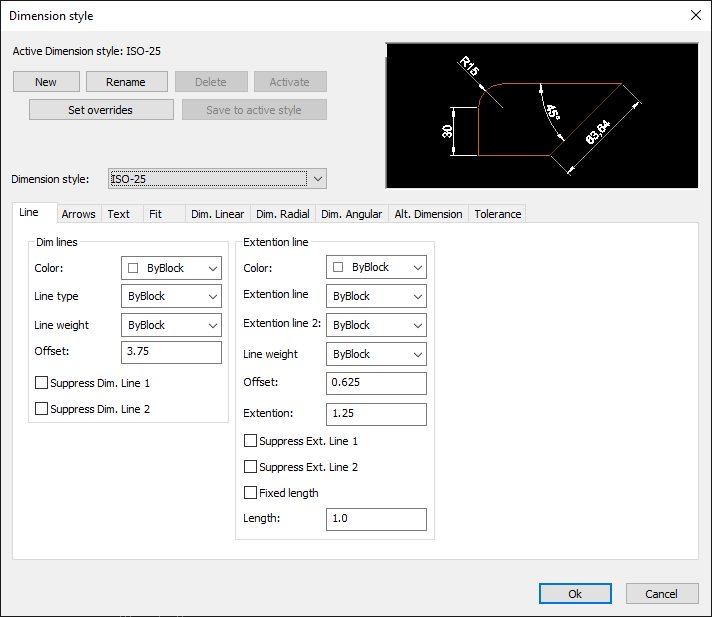
How to create a new dimension style:
- Click on Format > Dimension style on the Ribbon.
or
- Enter DIMSTYLE in the command window.
- Click the New button.
- Rename the dimension style if necessary.
- Click the Ok button.
How to rename a dimension style:
- Click on Format > Dimension style on the Ribbon.
or
- Enter DIMSTYLE in the command window.
- Select the dimension style you want to rename from the list of dimension styles.
- Click the Rename button.
- Enter a new name for the dimension style and close the dialog with "OK".
- Click the Ok button.
How to delete a dimension style:
- Click on Format > Dimension style on the Ribbon.
or
- Enter DIMSTYLE in the command window.
- Select the dimension style you want to delete from the list of dimension styles.
- Click the Delete button.
- Click the Ok button.
How to activate a dimension style:
- Click on Format > Dimension style on the Ribbon.
or
- Enter DIMSTYLE in the command window.
- Select the dimension style you want to activate from the list of dimension styles.
- Click the Activate button.
- Click the Ok button.
How to change the properties of a dimension style:
- Click on Format > Dimension style on the Ribbon.
or
- Enter DIMSTYLE in the command window.
- Select the dimension style you want to change from the list of dimension styles.
- Make the changes you want.
- Click the Ok button.