Line weight
With the command Lineweight you define the line width for new drawing elements.
This is how you open the line weight dialog:
- Click on Format > Line weight
 on the Ribbon.
or
- Enter LINEWEIGHT in the command window.
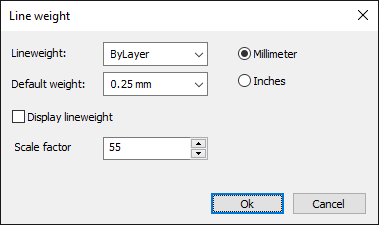
How to set the current properties for the line weight:
- Click on Format > Line weight on the Ribbon.
or
- Enter LINEWEIGHT in the command window.
- Choose between millimeters and inches for specifying the line weight.
- Select a line weight from the list, possible options are:
numerical value: for a fixed line width.
ByLayer: The drawing element has the line weight of the active layer.
ByBlock: New drawing elements initially have the standard line weight.
As soon as the new drawing element is combined in a block, the new drawing element receives the line width of the block.
Default: The standard weight is used as the line width.
- Select an entry for the standard width from the list.
- Switch the display of the line width in the graphics area on or off.
- Enter a scaling factor (in%) for displaying the line width in the graphics area.